
Leave Management Software for Field Teams
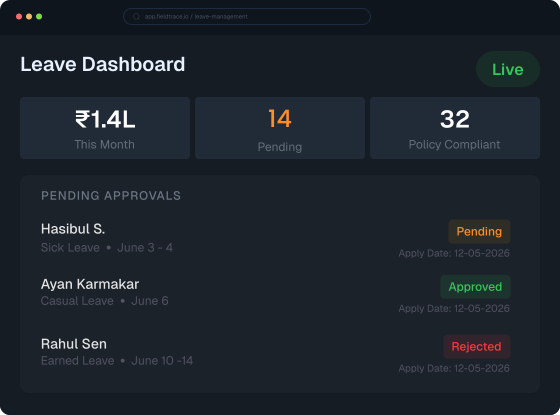
Primary Capabilities
Never Unified Before
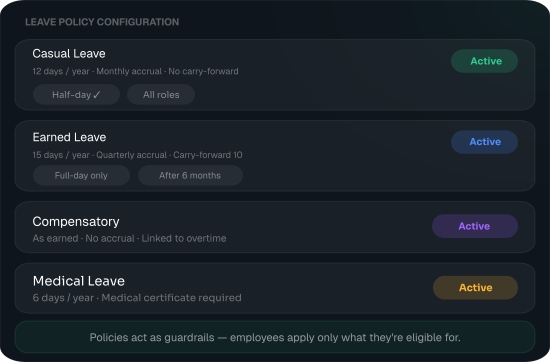
Define Custom Policies
FieldTrace allows organizations to define structured leave policies and apply them consistently across teams using a centralized employee leave tracking system. Go beyond basic tracking:
- Configure leave types such as Casual, Sick, Earned, Medical, Compensatory, or Custom Leaves
- Define accrual cycles, carry-forward rules, and eligibility
- Set half-day / full-day applicability
- Apply policy variations by role, department, or location
- Align leave rules with attendance and payroll calculations
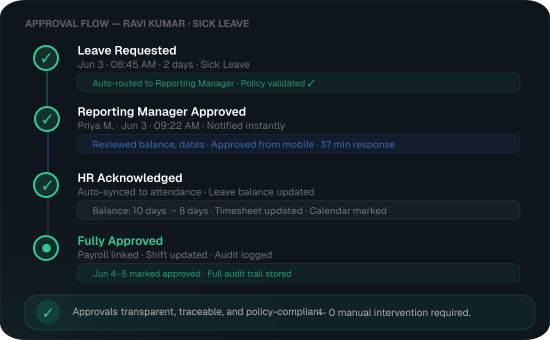
Approval Matrix with Clear Accountability
The leave tracking system in FieldTrace supports configurable approval workflows to match your reporting structure. It further allows users to:
- Create single-level or multi-level approval hierarchies
- Map approvers based on reporting manager, project head, or department
- Ensure visibility into pending, approved, rejected, or cancelled requests
- Maintain a complete audit trail of actions and decisions
- Prevent overlaps with shifts or critical assignments
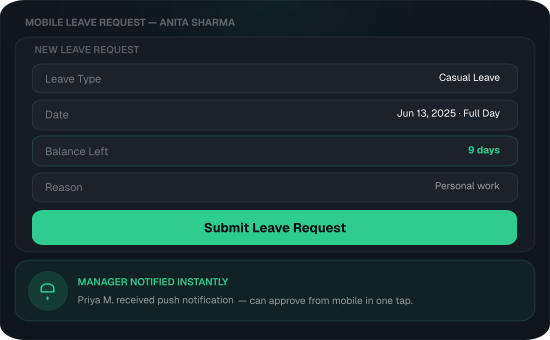
Apply & Approve Leaves Directly from Mobile
Built for teams that don't sit at desks.
- Employees can apply for leave from their mobile device
- Managers receive real-time notifications for approvals
- Review leave details, dates, and balances before approving
- Status updates sync instantly across web and mobile
- Works alongside attendance, GPS logs, and shift schedules
Leave Visibility That
Actually Helps Teams
FieldTrace's employee leave tracking system delivers instant visibility into leave data across teams, keeping HR, managers, and employees aligned without manual effort. As a unified leave and attendance management software, here is what you and your team can manage.

Leave Overview
Get a centralized view of leave patterns, upcoming absences, and workforce availability across teams.

Smart Filters
Quickly find leave records using filters like employee, leave type, date range, or approval status.

Leave Balances
Employees can easily track used, remaining, and accrued leave without manual HR follow-ups.

Shift Visibility
Monitor approved leaves against assigned shifts to ensure smoother workforce and shift planning.

Leave Calendar
View planned team leaves in one calendar to avoid scheduling conflicts and resource overlaps.
Why Choose Fieldtrace for
Leave Management?
FieldTrace's leave management scales reliably with your operations—no growing pains.
- Policy-driven leave control without added complexity
- Mobile-friendly for field, remote, and office-based teams
- Clearly defined approval ownership and workflows
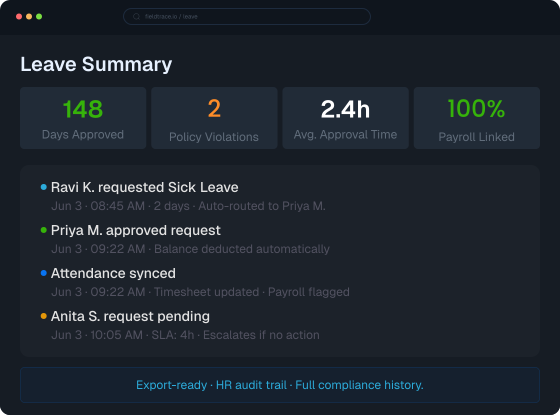
- Accurate, auditable records for HR and compliance needs
- Seamless integration with attendance and workforce data

Bring Clarity to Leave Policies without Disrupting Daily Operations
Explore how FieldTrace Leave Management fits into your workforce workflows.

Frequently Asked
Questions
Explore commonly asked questions about leave management, including leave requests, approvals, leave policies, attendance coordination, and how FieldTrace helps streamline employee leave workflows.
How does FieldTrace handle different leave policies across teams?
FieldTrace allows you to configure leave policies based on roles, departments, or locations, ensuring each team follows the rules applicable to them while maintaining centralized control.
Can managers customize the leave approval process?
Is leave data automatically linked with attendance records?
Can employees apply for leave using their mobile phones?
How does FieldTrace help avoid team availability conflicts?