
Quick Business Setup with FieldTrace
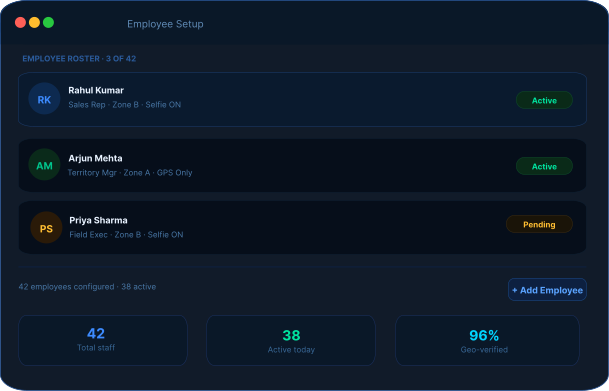
Get Started with Employee Setup
Employee Setup
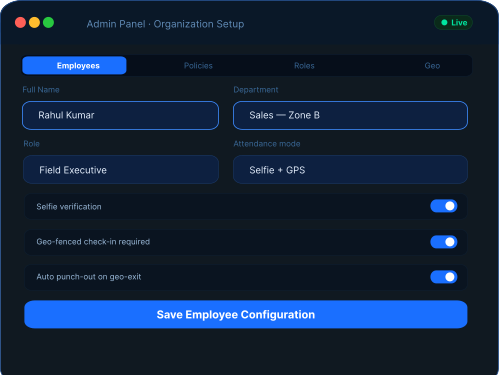
Quickly onboard employees into the system and configure attendance settings. FieldTrace helps streamline employee setup while ensuring accurate workforce records from day one.
- Complete Profile Details
Add employees with complete profile details and assign them to relevant departments during onboarding.
- Selfie-Based Verification
Enable selfie-based verification to ensure secure and authentic punch-in and punch-out attendance tracking.
- Set Attendance Preferences
Configure attendance preferences for individual employees or update settings for multiple users simultaneously.
Policy Controls
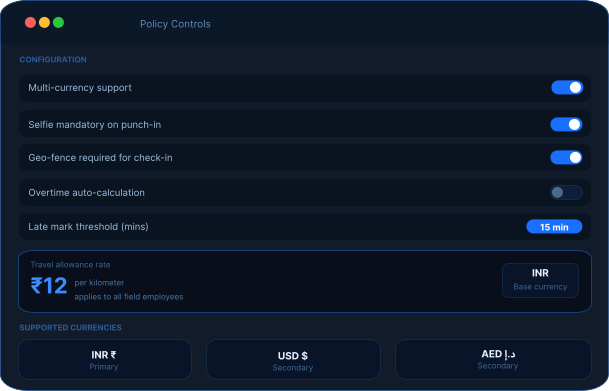
Customize operational settings based on your region, workforce structure, and company policies. Maintain consistency while adapting to different business requirements.
- Preferences for Multiple Currencies
Set multi-currency preferences to support operations across different regional locations.
- Precise Reimbursement Calculations
Define travel allowance rates per kilometer for accurate reimbursement calculations.
- Smooth Operational Consistency
Standardize organization-wide attendance and reimbursement policies for better operational consistency.
Allowance Management
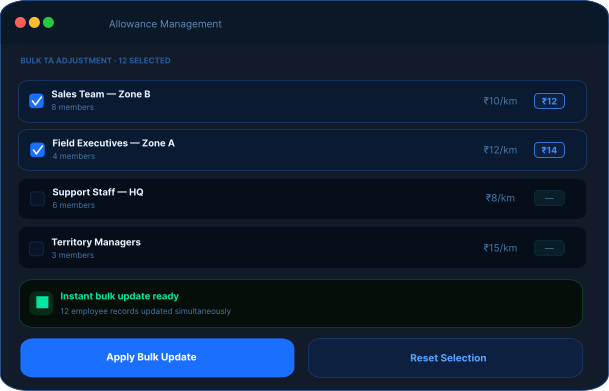
Manage travel reimbursements efficiently without repetitive manual updates. FieldTrace enables centralized allowance control for growing field teams.
- Bulk TA Updates
Adjust travel allowance settings for multiple employees simultaneously from a single dashboard.
- Instant Policy Updates
Apply policy changes instantly across teams without editing employee records individually.
- Bulk Allowance Controls
Reduce administrative effort and improve reimbursement accuracy with bulk allowance controls.
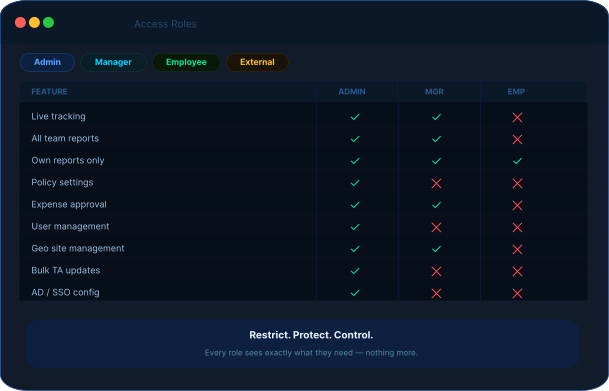
Access Roles
Assign responsibilities and system visibility through role-based access management. Ensure every user accesses only what is relevant to their role.
- Create Organization-Based Roles
Create Admin, Manager, Employee, and External User roles based on organizational responsibilities.
- Permission-Based Access
Control access to live tracking, reports, and operational data through permission-based visibility.
- Data Security Maintenance
Maintain data security by restricting sensitive information to authorized users only.
Geo Management
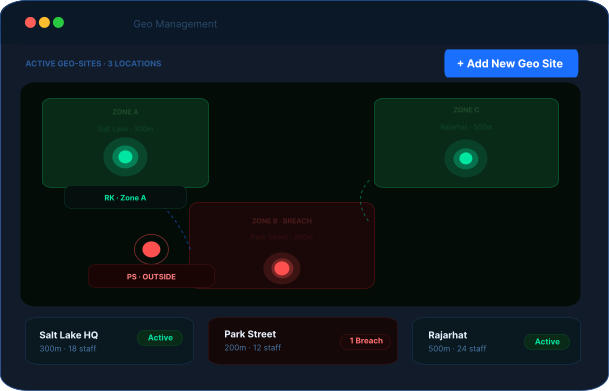
Monitor employee movement and enforce location-based attendance rules through intelligent geo-management settings.
- Uninterrupted Attendance Monitoring
Create geo-fenced sites and branch locations to monitor attendance and field movement effectively.
- Mandatory Office Check-In
Define mandatory office check-in parameters before employees proceed to field assignments.
- Auto Punch-Out Controls
Automatically punch out employees when they move outside approved geo-fenced boundaries.
Employee Setup
Quickly onboard employees into the system and configure attendance settings. FieldTrace helps streamline employee setup while ensuring accurate workforce records from day one.
- Complete Profile Details
Add employees with complete profile details and assign them to relevant departments during onboarding.
- Selfie-Based Verification
Enable selfie-based verification to ensure secure and authentic punch-in and punch-out attendance tracking.
- Set Attendance Preferences
Configure attendance preferences for individual employees or update settings for multiple users simultaneously.
Powering Smarter
Field Operations
A well-configured organization's setup doesn't just define structure — it streamlines operations, strengthens accountability, and gives you complete control over your field workforce.

Structured Workforce Management
Clearly defined departments, roles, and permissions eliminate confusion and improve accountability.

Enhanced Attendance Accuracy
Selfie-based punch-ins and geo-fenced check-ins reduce proxy attendance and ensure authentic time tracking.

Controlled Access & Data Security
Role-based permissions ensure sensitive data and live tracking visibility are restricted to authorized personnel only.

Simplified Policy Implementation
Set travel allowances, multi-currency configurations, and attendance rules centrally for consistent execution across teams.

Faster Bulk Operations
Manage multiple employee records, travel adjustments, and configuration updates in just a few clicks.

Improved Compliance & Monitoring
Geo-fencing and auto punch-out features ensure employees operate within defined operational boundaries.
Sync Your Workforce.
Simplify Access. Strengthen Security.- Seamless integration with enterprise directory systems
Integrate seamlessly with enterprise directory and identity management systems.
- Auto-sync employee data and organizational hierarchy
Automatically sync employee records and organizational structure in real time.
- Centralized authentication and access control
Manage authentication and user access through a centralized control system.
- Enable single sign-on (SSO) for faster, secure login
Provide faster and more secure platform access through single sign-on (SSO).

Master Your Field Operations—Total Control, Zero Chaos.
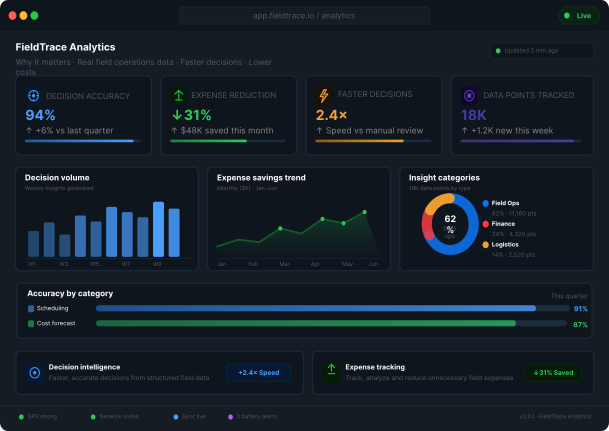
From task tracking and expense monitoring to automated reports and advanced integrations, FieldTrace Analytics gives you everything .

Frequently Asked
Questions
Everything you need to know about configuring your organization, managing employee access, and streamlining field operations.
How do I add employees to the system?
You can manually add employees directly from the admin dashboard by entering their details, assigning departments, and configuring attendance settings such as selfie-based punch-in/out.
Can I enable selfie attendance for selected employees only?
Can I update travel allowances for multiple employees at once?
How does role-based access work?
What are sites and geo-fencing controls?
Can the system automatically punch employees?